MQTT 与 WebSocket
一、核心概念与本质区别
1.1 核心定位对比
| 特性 |
MQTT |
WebSocket |
| 核心定位 |
物联网专用消息传输协议 |
浏览器与服务器的双向通信协议 |
| 传输层 |
基于 TCP/IP |
基于 TCP/IP(先 HTTP 握手,后长连接) |
| 通信模式 |
原生发布/订阅(Publish/Subscribe) |
全双工双向通信(无原生发布订阅) |
| 数据格式 |
二进制为主,轻量(最小数据包仅2字节) |
支持文本/二进制,数据包相对较大 |
| 核心优势 |
低带宽、低功耗、断连重连、QoS 保障 |
浏览器原生支持,Web 端双向通信 |
| 典型场景 |
传感器、智能家居、工业设备通信 |
Web 实时应用(聊天、股票、实时监控) |
1.2 发布订阅模式核心结论

- MQTT:协议层面原生支持发布订阅,内置 Topic(主题)、Broker(代理服务器)、QoS(消息质量)等核心机制,无需额外开发;
- WebSocket:仅提供双向通信通道,无发布订阅相关概念,需开发者在业务层手动实现主题管理、消息路由等逻辑。
1.3 常用组合:MQTT over WebSocket
浏览器无法直接通过 TCP 连接 MQTT 服务器,因此常用 WebSocket 作为传输层承载 MQTT 协议:

二、完整代码示例
2.1 示例1:MQTT over WebSocket(Web前端接入物联网)
1
2
3
4
5
6
7
8
9
10
11
12
13
14
15
16
17
18
19
20
21
22
23
24
25
26
27
28
29
30
31
32
33
34
35
36
37
38
39
40
41
42
43
44
45
| <!DOCTYPE html>
<html>
<head>
<meta charset="UTF-8">
<title>MQTT over WebSocket 示例</title>
<script src="https://unpkg.com/mqtt/dist/mqtt.min.js"></script>
</head>
<body>
<h3>MQTT 消息收发测试</h3>
<div id="msg-container"></div>
<script>
const brokerUrl = 'ws://test.*.com:8080/mqtt';
const clientId = 'mqtt_client_' + Math.random().toString(16).substr(2, 8);
const client = mqtt.connect(brokerUrl, {
clientId,
clean: true,
connectTimeout: 4000,
keepalive: 60
});
client.on('connect', () => {
console.log('连接成功');
const topic = 'test/websocket/mqtt';
client.subscribe(topic, (err) => {
if (!err) client.publish(topic, 'Hello MQTT over WebSocket!');
});
});
client.on('message', (topic, payload) => {
const container = document.getElementById('msg-container');
container.innerHTML += `<p>主题: ${topic} | 内容: ${payload.toString()}</p>`;
});
client.on('error', (err) => { console.error('错误:', err); client.end(); });
client.on('close', () => { console.log('连接断开'); });
</script>
</body>
</html>
|
2.2 示例2:纯WebSocket双向通信(服务器+客户端)
2.2.1 服务器端(Node.js + ws库)
1
2
3
4
5
6
7
8
9
10
11
12
13
14
15
16
17
18
19
20
21
22
23
24
25
26
27
28
29
30
31
32
33
34
35
36
37
38
39
40
41
42
43
44
45
46
|
const WebSocket = require('ws');
const wss = new WebSocket.Server({ port: 8080 });
const subscriptions = new Map();
wss.on('connection', (ws) => {
console.log('新客户端连接');
ws.send('欢迎连接WebSocket服务器!');
ws.on('message', (rawData) => {
try {
const data = JSON.parse(rawData);
if (data.type === 'subscribe') {
const topic = data.topic;
if (!subscriptions.has(topic)) subscriptions.set(topic, []);
subscriptions.get(topic).push(ws);
ws.send(JSON.stringify({ type: 'success', msg: `已订阅${topic}` }));
}
if (data.type === 'publish') {
const { topic, data: msg } = data;
if (subscriptions.has(topic)) {
subscriptions.get(topic).forEach(client => {
if (client.readyState === WebSocket.OPEN) {
client.send(JSON.stringify({ type: 'message', topic, data: msg }));
}
});
}
}
} catch (err) {
ws.send(JSON.stringify({ type: 'error', msg: '消息格式错误' }));
}
});
ws.on('close', () => {
for (const [topic, clients] of subscriptions) {
subscriptions.set(topic, clients.filter(c => c !== ws));
}
});
});
console.log('WebSocket服务器启动,端口8080');
|
2.2.2 客户端(HTML/JS)
1
2
3
4
5
6
7
8
9
10
11
12
13
14
15
16
17
18
19
20
21
22
23
24
25
26
27
28
29
30
31
32
33
34
35
36
37
38
39
40
41
42
43
44
45
46
47
48
49
50
51
52
53
54
55
56
57
58
| <!DOCTYPE html>
<html>
<head>
<meta charset="UTF-8">
<title>WebSocket 客户端</title>
<style>
#msgList { height: 300px; border: 1px solid #ccc; padding: 10px; overflow-y: auto; }
</style>
</head>
<body>
<div>
<h3>WebSocket 双向通信测试</h3>
<div id="msgList"></div>
<input type="text" id="msgInput" placeholder="输入消息">
<button onclick="sendMsg()">发送</button>
<button onclick="subscribeTopic()">订阅chat/group1</button>
<button onclick="publishMsg()">发布到chat/group1</button>
</div>
<script>
const ws = new WebSocket('ws://localhost:8080');
const msgList = document.getElementById('msgList');
ws.onopen = () => addMsg('系统', '连接成功', 'green');
ws.onmessage = (e) => addMsg('服务器', e.data, 'blue');
ws.onclose = () => addMsg('系统', '连接断开', 'red');
function addMsg(sender, content, color) {
const item = document.createElement('div');
item.style.color = color;
item.innerHTML = `[${new Date().toLocaleTimeString()}] ${sender}:${content}`;
msgList.appendChild(item);
msgList.scrollTop = msgList.scrollHeight;
}
function sendMsg() {
const msg = document.getElementById('msgInput').value;
if (ws.readyState === WebSocket.OPEN) ws.send(msg);
}
function subscribeTopic() {
ws.send(JSON.stringify({ type: 'subscribe', topic: 'chat/group1' }));
}
function publishMsg() {
const msg = document.getElementById('msgInput').value;
ws.send(JSON.stringify({ type: 'publish', topic: 'chat/group1', data: msg }));
}
</script>
</body>
</html>
|
三、场景选择与核心总结
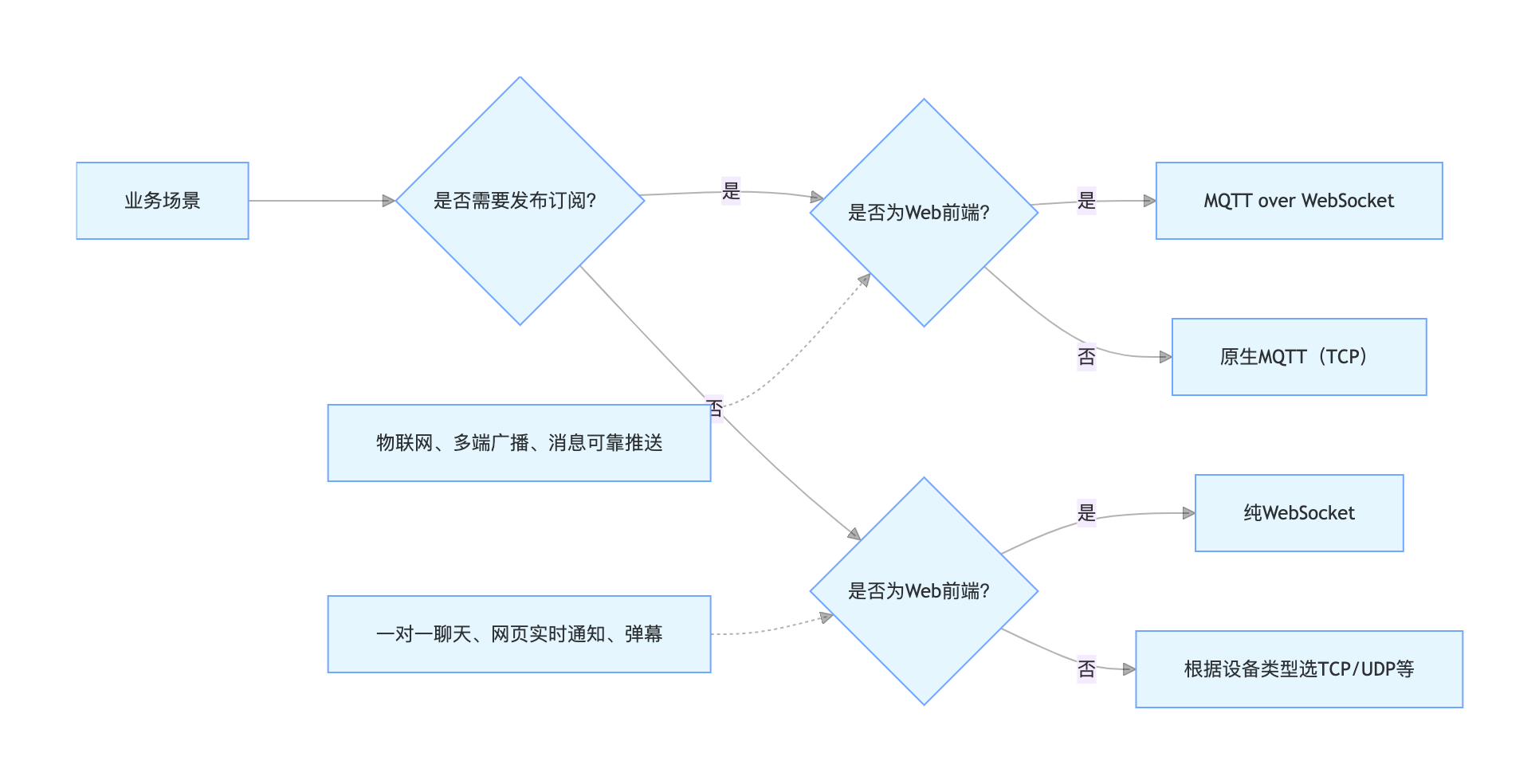
3.1 场景选择导图
3.2 核心总结
- 本质差异:MQTT 是「发布订阅消息协议」,WebSocket 是「双向通信通道」;
- 发布订阅:MQTT 原生支持,WebSocket 需手动实现业务层逻辑;
- 组合使用:MQTT over WebSocket 是 Web 前端接入物联网的标准方案,WebSocket 负责连接,MQTT 负责消息分发;
- 场景选择:物联网/多端广播用 MQTT,纯 Web 实时交互用 WebSocket,Web 接入物联网用 MQTT over WebSocket。